
You decide who returns
Two labeled photo slots keep the casting clear. Swap them to tell the story from the other side.
TWO FACES. ONE UNFORGETTABLE REUNION.
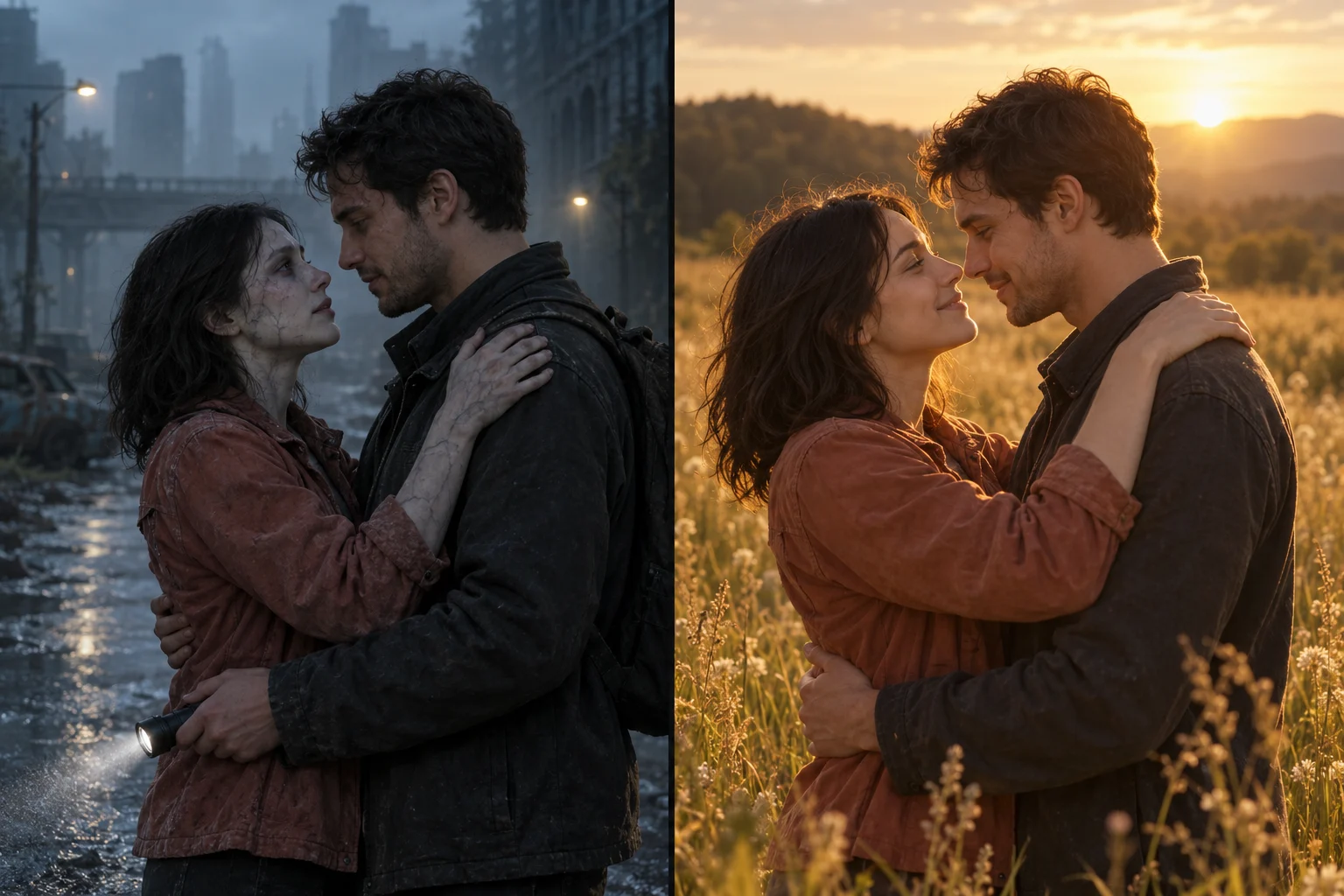
Turn two portraits into a reunion on a misty street. Choose the optional 10-second transformation story to connect it to a warm meadow ending with a separately approved end frame.
Start with a scene preview, then animate it. Each step uses credits, with the cost shown before you begin.
Cast two people, create a paid 9:16 scene preview, then turn it into a 5 or 10 second video.
YOUR ZOMBIE LOVE STORY
The default reunion stays on the same street for 5 or 10 seconds. The transformation story requires 10 seconds, a model that supports start and end frames, and a separately generated, paid, and approved end frame. Timing and likeness can vary.
The first character returns with a subtle zombie transformation, still recognizably themselves.
The survivor lowers their flashlight. The mood shifts from uncertainty to recognition.
The distance closes. A gentle hug becomes the heart of the scene.
The optional transformation ends at your approved meadow frame, showing the same pair as healthy humans. The start and end frames guide the transition.
HOW TO MAKE A ZOMBIE AI VIDEO
Photo one becomes the zombie; photo two is the survivor. Use well-lit photos with one visible adult face each, and swap the roles whenever you like.
Create and review a vertical 9:16 opening scene. For transformation, then generate and approve a separate meadow end frame; each frame is charged separately.
Choose your story, model, and audio settings. Reunion supports 5 or 10 seconds. Transformation needs 10 seconds, a model that supports start and end frames, and both approved frames.
A STORY WITH YOUR CAST
Two labeled photo slots keep the casting clear. Swap them to tell the story from the other side.
The preset uses mist, faded clothes, and a flashlight. It excludes blood, injuries, weapons, and attacks.
Review the paid image preview first. Reuse a successful scene when retrying the video, and see the price for each action.
CHOOSE YOUR PACING
Duration alone does not change the story. Reunion stays in one scene at either length. Transformation requires 10 seconds, a model that supports start and end frames, and a separately paid and approved end frame. The generator quotes each frame and video separately.
| Story direction | 5 or 10 seconds · Reunion | 10 seconds · TransformationTwo-frame option |
|---|---|---|
| Recognition and an embrace | Included | Included |
| Separate meadow end frame | Not requested | Included |
| Vertical opening scene | Included | Included |
| Add your soundtrack after download | Included | Included |
This example guides the default 10-second reunion on the same street. The optional transformation uses a different direction and also requires an approved, separately paid end frame and a model that supports both frames.
Animate this vertical 9:16 scene into a gentle fictional zombie love story. The LEFT zombie is photo 1; the RIGHT survivor is photo 2. Preserve both distinct adult identities and faces; do not swap them. Over 10 seconds: the survivor recognizes their gentle zombie partner, keeps the flashlight lowered and opens their arms. They close the short distance and share a tender embrace. Keep this reunion on the same misty street, without a scene change. Use natural motion and a slow cinematic camera; keep both faces recognizable and both people in frame. No blood, wounds, biting, attacks, weapons, extra people, text, or watermarks.
The default creates a vertical opening scene from two photos, then animates a 5 or 10-second reunion in that same scene. Transformation is optional: choose 10 seconds and a model that supports start and end frames, then generate and approve a separate paid meadow end frame before animating.
The first photo is the zombie character and the second is the survivor. Use the swap button before generating the scene to reverse the casting.
Every scene frame and video generation uses credits. Reunion needs one opening frame; transformation needs separately generated and charged opening and end frames, plus the video. The current cost and total are shown before each action. Regenerating any successful step uses credits again.
No. The default reunion stays on the same misty street for both 5 and 10 seconds. For the sunny ending, select Transformation, use 10 seconds and a model that supports start and end frames, and separately generate, pay for, and approve the meadow end frame before making the video.
The preset asks for a gentle fictional zombie appearance and explicitly excludes blood, wounds, biting, attacks, and weapons. The survivor carries a flashlight. Your photos and the model's content checks still affect whether a task can run.
No song is bundled or licensed with the generator. Add your own permitted audio after downloading, or use the music library of the platform where you post.
Failed or canceled tasks follow the existing automatic credit refund process. If animation fails, your successful scene preview stays available for another video attempt. A successful preview remains a separately charged image task.
The prompts ask the models to preserve the two identities and follow the story, but AI outputs vary. Check the still preview first. Facial details, motion, and the sunny transition are creative results and cannot be guaranteed.
Bring two portraits and give your reunion a cinematic beginning.